
Building a Practical Browser Agent
The DeepSky approach to robust and verifiable AI agents


In this blog post we showcase our AI agent that achieves state-of-the-art performance on browser use tasks. Our evaluations on WebArena, a dataset designed to measure the efficacy of agents in completing real world tasks using a browser, achieve 66.9% accuracy, higher than everything else openly available at the time of publication.
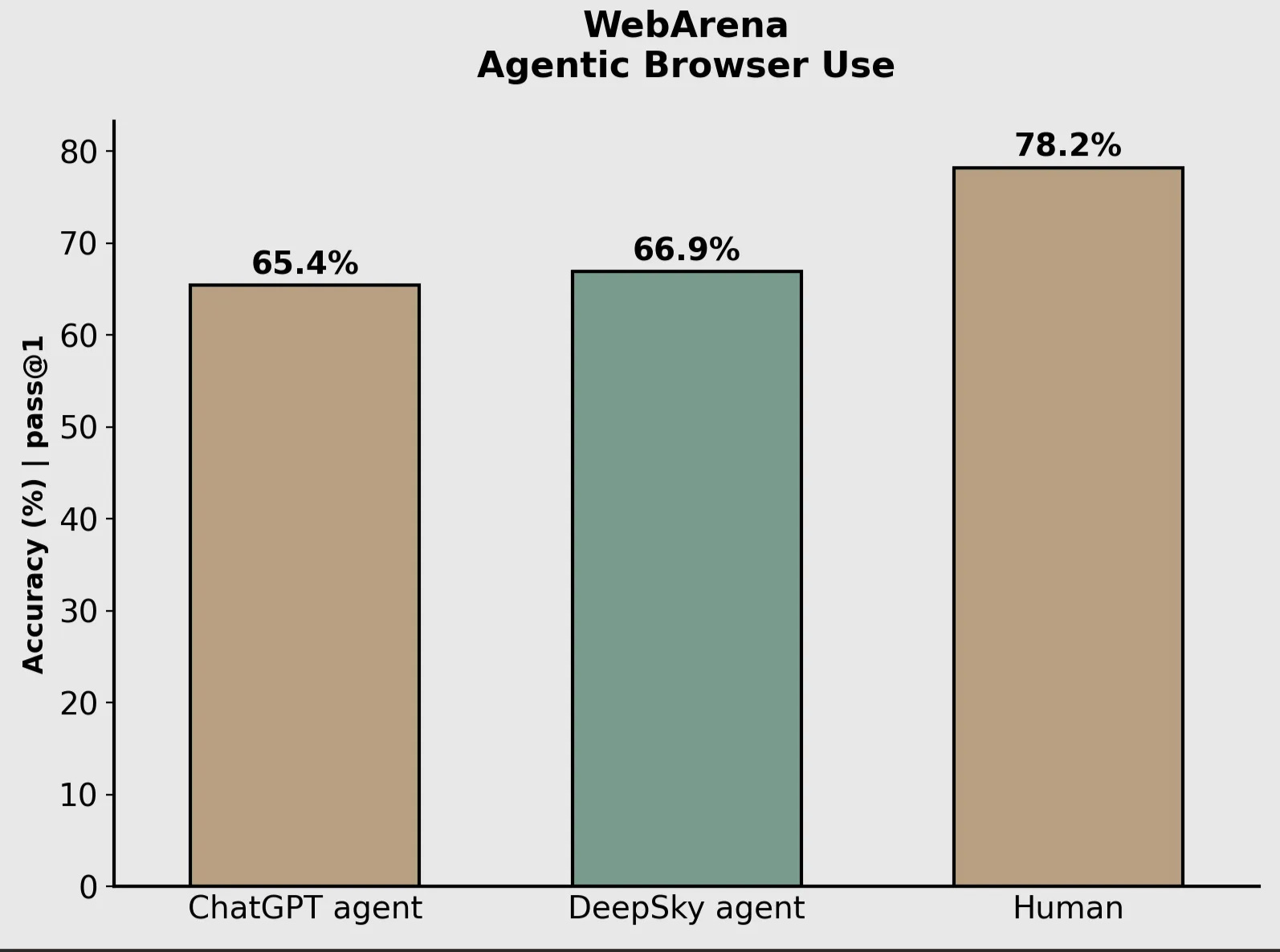
The current SOTA in this is OpenAI agent which works by combining agentic steering with their computer use model and a text based browser underneath.
By contrast, we built our agent as a fusion of browser manipulation techniques:
A computer use model (we use Sonnet 4) that can interact with the browser directly by clicking, typing, etc.
Tools that allow the agent to access DOM elements using Playwright
Tools that allow the agent to parse webpage DOM via the Chrome Accessibility Tree
Techniques (2) and (3) allow for both observation and manipulation of the browser state for cases where screenshots and CUA agents can fall short.
The browser agent is then provided as a tool to the DeepSky planner agent, which is optimized for performing deep research, so it has mechanisms for reflection, planning and course correction between browser use tool calls.
In the rest of this blog post, we’ll discuss key features of our browser agent, results of an ablation study showing how these key features improved the agent’s WebArena score, a review of the WebArena dataset, and finally some hard problems within the domain of browser use tasks, both solved and unsolved.
DeepSky Browser Agent
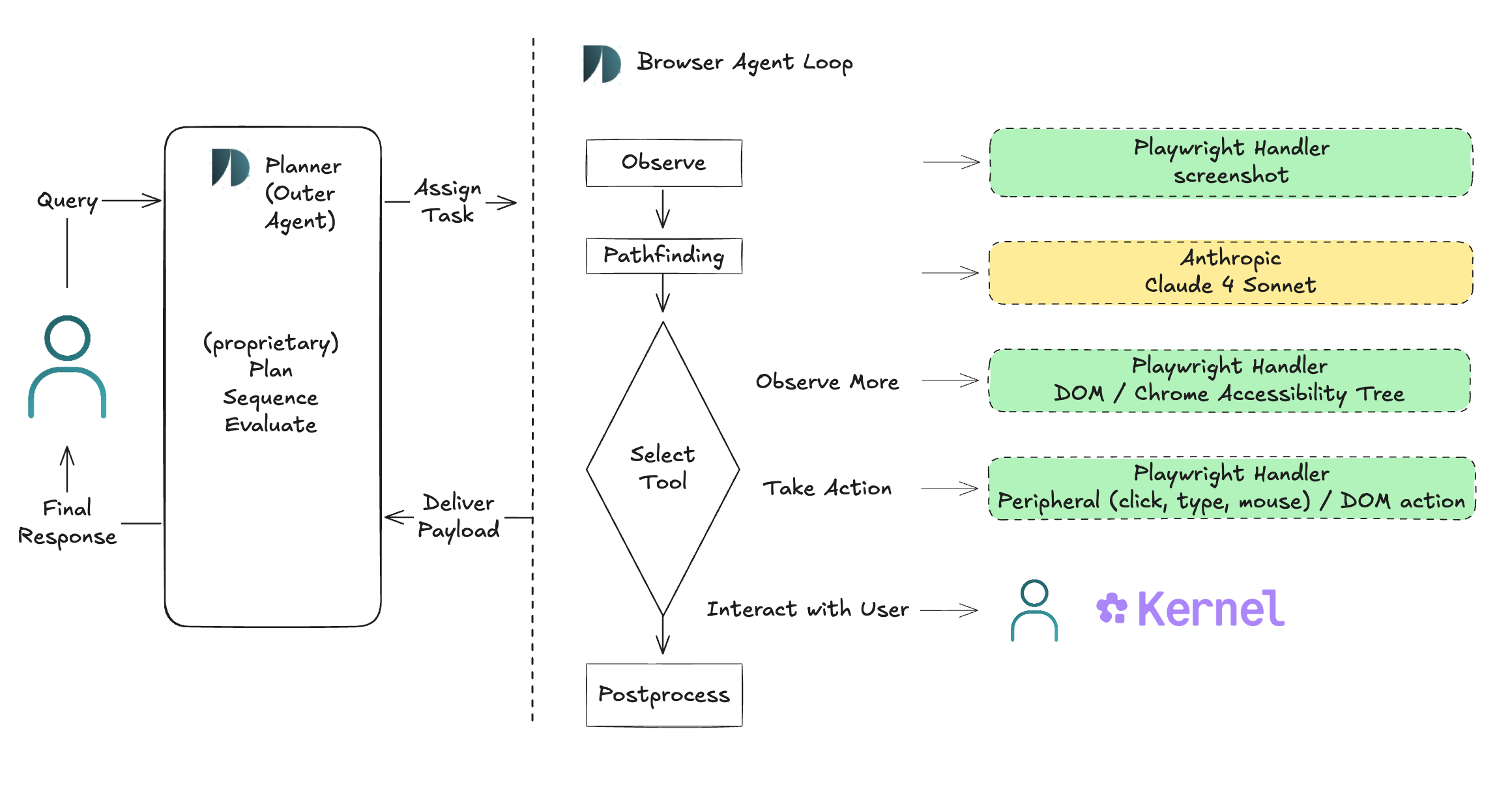
The DeepSky Browser Agent contains the following key features:
Computer use agent (CUA) leveraging Anthropic’s Computer use tool with Claude 4 Sonnet
Tools that give access to the Chrome Accessibility Tree and the browser DOM with the ability to manipulate it using Playwright
Narrowly focused, task-directed pathfinding algorithm
Hyperopic planning and evaluation outer agent system
User ↔ Agent shared browser interaction
Computer use actions are the most natural way to interact with a browser and are super powerful. However, we find that they are not 100% successful, and in these cases we allow Browser Agent to observe and interact with webpage DOM directly. DOM manipulation is helpful when peripheral actions would be slow, e.g. when extracting text that requires scrolling. Similarly, DOM observation is helpful when webpage screenshots are cluttered or otherwise occlude important information. We address these scenarios in more depth in the “Failure Modes” section below.
We additionally format DOM for the agent using Chrome’s Accessibility Tree since direct DOM rendering can be low signal - missing important context, or containing noisy artifacts. For examples where the accessibility tree can provide useful additional context or remove noise see here.
Observe/Think/Act steps in the Browser Agent loop are chained together via a pathfinding algorithm that is spiritually A* and is implemented via DeepSky’s flavor of a model spec to shape model behavior. The guidelines in our spec explicitly outline the trade-off between explore/exploit, initially encouraging the agent to build an understanding of the webpage’s navigation scheme, and then later on using this understanding efficiently by stepping along the shortest estimated trajectory among multiple, dynamically updated candidates.
Finally, the browser agent is wrapped in our proprietary, higher-order agent system which is responsible for planning, sequencing, and evaluating browser path invocations. This imparts robustness - browser loops learn from previous mistakes - and multiplies the operating capacity of a single path.
A User ↔ Agent interaction pipeline aligns agent trajectories to user intent by conditionally requesting user control of the browser state. While this feature has proven integral in our own internal testing, we do not discuss it further in this blog post as the WebArena eval does not evaluate human assisted task performance.
Ablation Study
We conducted a short ablation study to understand the impact of key features explained in the previous section. Here, impact is measured by WebArena Eval overall accuracy (pass@1). See the WebArena Eval section for an overview of the eval.
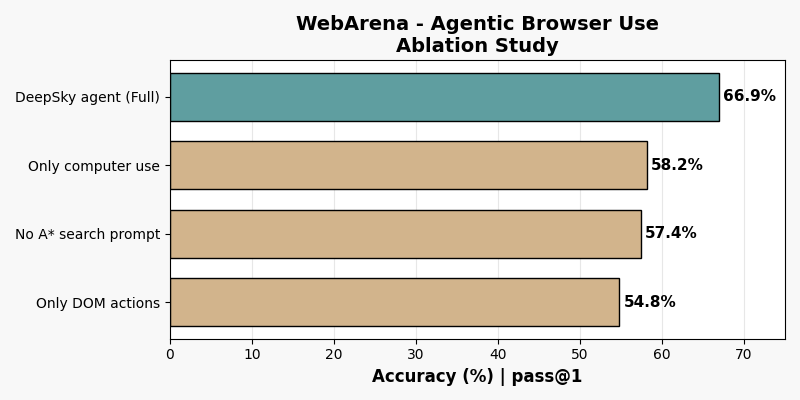
Utilizing only peripheral + screenshot or DOM + accessibility tree interfaces is worse than using them in tandem, showcasing that the interfaces are indeed complementary. Also, removing our pathfinding algorithm drops performance by roughly the same magnitude as removing either interface.
WebArena Eval
WebArena is a benchmark and a testbed consisting of a set of tasks which can be completed by manipulating various websites using a browser. The testbed contains sandboxed, self-hosted versions of the following websites: OpenStreetMap, Reddit, an E-Commerce website with a companion admin, back-office website, GitLab, and Wikipedia. This results in a testing environment that is highly realistic and reproducible.
While WebArena was critical to provide a quantitative metric for us to iterate to a robust browser agent, we also made some observations for improving the quality of the benchmark further:
There are a handful of tasks with labeling inaccuracies (tasks 591, 592, 593 for instance use year 2030 instead of 2023).
Some evaluation logic appears unusually strict.
WebArena tasks are graded using up to 2 of 5 scoring functions depending on the task intent. One of these scoring functions sends a prompt to a LLM judge to compare the agent answer to a reference, i.e. “fuzzy match.” We observed that fuzzy match scoring resulted in a number of false negatives. When we swap out the Fuzzy match prompt in WebArena with one that we wrote, our accuracy on fuzzy match scored tasks improves from 56.8% to 71%. See Appendix.1 for more details.
In the testbed the OpenStreetMap implementation is buggy and is hard to bring up. Because of these issues, we fell back to using public OST for some examples. In result, our agent was penalized for getting distances slightly off (1.6 vs 1.7km or 44 vs 45 minutes were scored as 0).
In order to present a fair comparison to other leaderboard participants, we report our agent’s score using WebArena’s official scoring function (not accounting for 1, 2 or 3 above). We subsequently feel the WebArena human score of 78.24 is close to the saturation point of the eval, making our agent’s score of 66.9 high in absolute terms as well - 85.5% under this implied rescaling. We discuss how we intend to close the remaining gap in the next section.
Common Failure Modes for Browser Agents
Browser Agents often have poor generalization across common workflow patterns. Here we describe some common failure modes we have observed in our testing. Some of these are well solved (✅) by the current iteration of our Browser Agent, and some are ongoing directions for research.
Inefficient peripheral chains ✅
Some browser tasks are inefficient to solve with peripheral actions. You might’ve felt this yourself if you ever had to scroll and select a wall of text to copy. In many of these cases, interacting with DOM elements directly can collapse long peripheral chains into a single action.
Content occlusion ✅
Screenshots of complex webpages can occlude important information or make it difficult for Browser Agent to infer interactive elements. A particularly pernicious example is
<select>elements, which are styled at the OS level and can disappear entirely from browser screenshots! In these cases, observing the DOM directly - and more cleanly through the Accessibility Tree - augments screenshots with complete schematic information.Map manipulation remains challenging ⚠️
OpenStreetMap - one of the websites included in WebArena Eval - doesn’t have the most user friendly UX. Because of this, successfully completing a task involves looking around in the actual map page and being flexible with searches.
An example is a task which involves finding the closest Starbucks to Carnegie Mellon. Browser agents often fail this task as when they search Starbucks near Carnegie Mellon, no results are returned. Achieving success requires searching for Starbucks near Pittsburgh and then visually using the map layer alongside the legend which is in a different webpage to find the closest Starbucks to Carnegie Mellon.
We were able to get around some of these issues by enforcing stricter guidelines and adding few shot examples to teach the agent how to navigate general map-like websites, but this remains an area that would need further improvement.
Mistakes when aggregating data ⚠️
Many tasks in WebArena involve counting the number of instances such as: positive reviews for a product, mentions of git repos, number of searches for a particular product, number of sales for a product. For such tasks LLMs struggle with keeping track of exact quantities like the count so far and ultimately this results in failures on tasks around finding the most popular products or the ones with most number of negative reviews.
We have addressed some of these issues with a post-processing & a memory module for Browser Agent, but additional capability at the browser agent level is necessary to fully address this issue.
Preference for generic approach 🔴
A standard failure mode of LLMs is dropping preference adherence, especially after long, multi-turn conversation.
For example, tasks in WebArena involve posting on subreddits to ask particular questions such as “should I own a car in nyc?”, “what is the best console to buy?”. The agent tends to go to r/askreddit for these questions when the eval is expecting it to go to r/nyc and r/consoles. Tuning the agent to find preferred matches for a task instead of the first available match is a promising future direction.
Conclusion
At DeepSky, we build AI agents that work. In a user’s hands, a well-working agent is like a trusty sidekick. It is aligned to the user’s intent, empowered to succeed in the situations arising from that intent, and robust to continue succeeding as those situations vary.
We discussed how our browser agent hits the mark on these criteria, as well as some areas for continued improvement. Yet browser use is only one feature of our holistic agentic architecture. The same design principles that govern well-working agents also apply to agents of well-working agents, and so forth. This recursive and expressive approach helps us operate at the frontier of what’s possible with foundational LLMs.
If the content of this blog post resonates with you, shoot us a note. We’re always hiring!
Appendix
False negatives in WebArena “fuzzy match” scoring function typically occurred when our agent provided more comprehensive answers.
Task ID: 119
Tell me the reasons why customers like Antonia Racer Tank
reference: Its color and style is good
pred: Based on the analysis provided, the response indicates that customers are drawn to the product's marketing features rather than actual satisfaction. However, extracting what customers theoretically like based on the marketed attributes:

The style and comfort are appealing
score: 0.0

----
Task ID: 121
Tell me the reasons why customers like Circe hooded fleece
reference: Warm and comfortable. True to size.
pred: Incredibly soft and cozy fleece material. True to size fit. Long enough sleeves. Functional hood for extra warmth. Comfortable layer for outdoor activities.
score: 0.0

----
Task ID: 166
What are the main criticisms of this product? Please extract the relevant sentences.
reference: N/A
pred: N/A (Reason: only one minor criticism found regarding skepticism about product efficacy claims)
score: 0.0
We note that this does not contradict the original WebArena’s authors finding that their fuzzy match function is “extremely accurate.” As we’ve identified in previous eval blog posts, LLM eval prompts are typically written and tested with a fixed underlying model in mind. Swap out the model (agent, etc.), and you reduce alignment of the prompt, effectively penalizing 3rd party submissions. Borrowing language from statistics theory, most LLM evals estimate accuracy point-wise with respect to an eval prompt. However, incidental details of the prompt should be treated as a nuisance parameter and removed, either by marginalizing over different prompts or otherwise estimating from a sufficient statistic. Exactly how to do this is easier said than done and likely merits a separate blog post.